How it works
Notice, connect, try, feel. Then round again
AION is a loop with feedback. You record a little each day; your assistant counts what repeats; you try one small change; your records show what changed. Here is each step, with the rules the app actually runs.
1. Notice: a record you can trust
Every check-in asks three things: energy (low, steady, high), mood (low, okay, good) and how long you slept. Stress, movement, symptoms, your period and a note are there when you want them. You can also answer Good, Okay or Not great straight from the reminder or your Apple Watch.
A blank day is unknown. AION never fills it in, never counts it as a good day or a bad one, and leaves it out of every count and every average. A missed day is a missed day.
2. Connect: counting, with a floor
AION looks at the last 14 days. It says nothing until there is enough to count:
- 10 days with your energy or mood within the last 14 days (a one-tap answer stays in your diary, but it is not counted here)
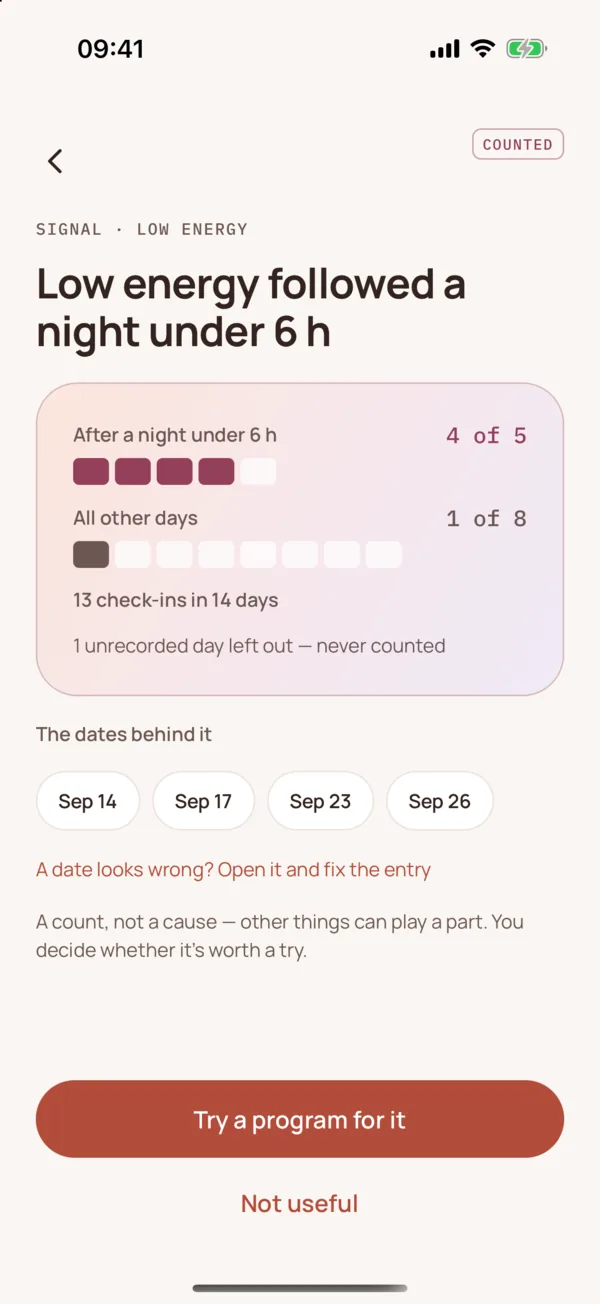
- 4 or more days with the factor, such as a night under 6 hours
- 3 or more of those days with the state, such as low energy
- 3 or more days without the factor, to compare against
- and the state has to be more common on the factor days, by 30 percentage points or more, with at least 3 matching days on that side
When all of that holds, you see a signal: two counts and the dates behind them. “Low energy on 4 of 5 days after a night under 6 h; on 1 of 8 other days.” Tap a date and you see the entry. If a date looks wrong, you fix the entry and the count changes.
AION only looks for pairs from a reviewed list: short sleep and low energy, short sleep and low mood, high stress and low energy, high stress and headache, no movement and low mood. Nothing you record can turn into a finding nobody reviewed.
3. Try: one small, reversible change
A program is one change from a reviewed catalogue of 28, run for 7, 14 or 21 days. It starts from the goal you chose on day one, or later from a signal. Each day you answer one question: did you do it? “Not today” is an answer, and a useful one.
Free runs 1 program at a time; AION Plus runs up to 30. Each yes adds a point to the areas the program works on, and levels only go up. Nothing is taken away for a missed day.
4. Feel: the result, said plainly
At the end, AION compares the measure the program is about (sleep, energy, mood or stress) on the days you did it with the days you didn’t. With AION Plus it also compares against the 14 days before you started. The result is one of four, and each names the comparison it used:
- Better, for example “longer sleep on the days you did it”. Worth keeping, or adjusting to fit your week.
- The other way, for example “shorter sleep on the days you did it”. Said plainly and without blame: this change may not suit you right now, or something else was going on those days.
- No clear difference. Said as plainly as a good result. Try another, or the same one again.
- Not enough days to compare. Too few answers or check-ins to compare honestly; nothing is guessed about the missing days.
Then you choose: keep it, adjust it or stop it. The loop starts again, with more of your own records behind it.
Where a finding comes from
Every sentence the assistant shows carries a tag. There is no confidence percentage anywhere, because a percentage would claim more than a count can.
| RECORDED | What you entered, as you entered it. |
| COUNTED | Arithmetic over your entries: how many days, which dates. |
| ESTIMATE | Projected from your recorded or stated cycle, with a window of days. |
| EARLIEST | A finding that sits exactly on the minimum amount of data. |
| SAMPLE | Demo data, never yours, always labelled. |
| ILLUSTRATIVE | An explanation of how something works, not data. |
What stays on the phone
The counting runs on your iPhone. So does voice input, which uses Apple’s on-device recognition, and the reading of lab reports. Your diary is stored on the phone. From AION 0.5, iCloud keeps your settings only; AION 0.4 also backs the diary up to the private database of your own iCloud. Our server holds an anonymous account and your subscription status, nothing you record. The details are in the privacy policy.
Language models
Only if you turn it on. AION counts your records with fixed rules on your iPhone. With Settings → AI insights on, a language model rewords what your iPhone counted: it receives your question and a short list of counts, never your diary, your notes or your lab files, and questions about an emergency, self-harm or medical advice never leave the phone. The privacy policy and the terms of use say exactly what is sent.
We measured twelve language models on the questions people ask a diary. Every one kept to the safety lines. None of them counted reliably on its own; when AION did the counting and the model only wrote the sentence, correctness rose on all four models we tried that way. That is the order the cloud answers keep: the engine counts, the model phrases, and only when you turn it on. Read the research note.
What AION will not do
AION does not diagnose. It does not advise on medicines, supplements, doses or diets. It does not predict fertile days, and it is not contraception. Ask it one of those and it says so: a question for a person. If a message sounds like a crisis, the first thing it shows is where to get help now.
AION will not give you a biological age, a life-expectancy number, or a single health score.
Start with one check-in
Energy, mood and last night’s sleep. Your assistant does the counting from there.